Choosing The Right Mobile Terminal
For Your Application
Mobile Terminals will range in cost, performance, size and robustness, depending on the applications that they are required for. Determining the right type of terminal is generally the first step when considering Auto ID equipment.
A number of questions must be answered when determining which mobile terminal is right for you.
1./ Do you need a Linear Imaging or Laser Scanner for your Terminal? - It could save you money in your decision. Click link to see more information as well as short video on performance indoors and outdoors on Laser Vs Linear Imager.
2./Is it mission critical that information be live to and from the terminal or is a memory-batch terminal sufficient?
3./Does it need to be robust? What environment will the scanner be used in.
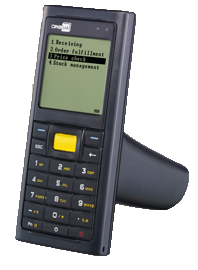
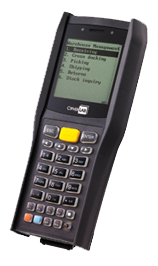
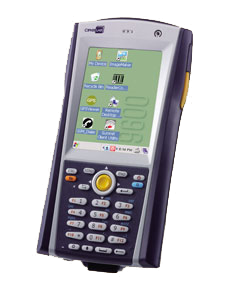
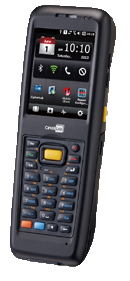
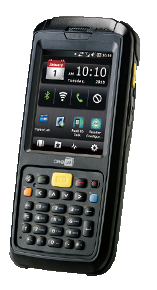
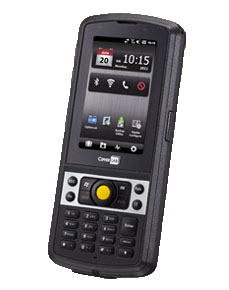
4./Consider whether it is critical that you need a Windows based terminal like the 9400 and 9600 Series or character based operating system on your terminal like the 8000, 8300 & 8500 Terminals.
If considering a Batch Terminal, all CipherLab’s range of PDTs come with free software called the Forge Batch Application Generator. This software is free and enables you to develop your applications, menus, forms, the way you want them. It also allows you to decide on what ASCII output you would like to give your data. You can have a CSV comma delimited text file as a output or you can also have a TAB delimited file as a output. Dump it straight into a spreadsheet. If you are requiring logic and tha data to be sent directly into your backend system, then all Character based O/S CipherLab terminals can be written in Basic or C. For More information interfacing Character based or Windows based operating systems, clink the link for further information.
Warehousing and Logistics, and field services usually requires scanners to be subjected to weather conditions, dust, dirt, oil, water and users who are not so compassionate about the hardware they are using. This means they should have an appropriately high IP rating up to IP 64 or 65 and drop ratings of between 1.2m -1.5m.
For retail environments and clean and carpeted environments, such as hospitality, healthcare and libraries, then IP Ratings are not so important. The 8000 Series is ideal in this environment where it is not ideal in warehousing and logistics.
Does your PDT need to be a Windows operating system or a Character based operating system? CipherLab manufacture both Windows O/S and Char based PDTs. The only right answer to this is which is the most cost effective way of getting the data collected by the terminal, for your application, down into your system.
Click our article on Windows vs Dos Terminals for more information on this (Article)
Batch (Memory)Terminals + Application Generator
All Cipherlab's terminals can be purchased as just a Batch Terminal.Cipherlab's batch terminals range from the 8000 Series to the 9400 Series.
Data is transferred up and down between the terminal and PC, via a USB or serial cradle. The terminals can be programmed by either the free software utility called the Application Generator (AG software), or they can be programmed in Basic & C for the 8000, 8300 & 8500 Series. In most cases, the easiest and most economical is using the AG software.
Forge Batch Application Generator
Cipherlab offers a free software utility called the Forge Batch Application Generator (A.G.) with all their PDTs.
Why pay for expensive software development costs when all you might need is the Forge Batch Application Generator. With very llittle or even no software experience, you can design applications with A.G software.yourself.
THe A.G.software helps develop your apllications that best suit your business. You can use it for multiple applcations such as stocktaking, invenory control, receipting of goods, dispatching of goods.....etc etc. Wherever you have to track and trace items with barcodes. All Cipherlab Terminals come pre-loaded to collect the Item barcode and Quantity. But if you require more data such as location, time and date stamps,, users....etc, this can all be modified quite easily.
The program is downloaded onto your desktop and by simple drill down buttons, you can format your applications, menus, format your screens and forms the way you want them for yourself or your customer. No code required to be written. Once your application is developed, download your application back into your Cipherlab terminal. You now can collect the data in the format you have created and dump it back to your host as either comma delimited text file (CSV) into a pre-designated location or straight into a excel spreadsheet. Its your choice! You can program the PDT for many other ASCii outputs
The A.G. software also gives you the ability to store a lookup table on your Cipherlab PDT. This means you can store your stocklist or database of products on the terminal so when you scan the barcode on your product, information on that product can be produced on the screen. Information such as description, quantity, location, price, etc etc.
All Cipherlab products come with setup manuals which can also be downloaded from the Cipherlab website.
Some features on the A.G:.
Can create multiple applications.....i.e.; you can create a stock take, receiving and dispatch application all on the one template.
Ability to store look up files....
Can insert look up fields if new products come onto shelf. Can also show warnings if input data has no match.
Can create up to ten forms and ten menus.
Have time and date stamps.
Security checking
Multiple Languages supported
Barcode Symbology settings available.
Data Editing
Wireless Terminals
The complete range of Cipherlab terminals come with the ability to communicate with Bluetooth, Wi-Fi (802.11b/g) and GPRS.
Depending on the application and ruggedness that you require for your terminals, will depend on your choice of Cipherlab Terminal. It will also depend on how you decide to connect your Wireless Terminal to your database. Do you require a Windows enviroment for your application? With all the hype of Windows O/S terminals, many customers get caught up in this think they need all the whistles and bells that go with it. THere are pros and cons of Windows Terminals vs Dos Text Terminals. It may come down to your developer and what they feel comfortable with as well. If you do not need emailing, surfing the net or VOIP, why choose a Windows O/S terminal. Cipherlab give the choice of both to the customer.
The 8000, 8300 & 8500 (Dos Text Enviroment) series can be run with terminal emulation - VT100, 220 & IBM 5250. Terminal Emulation . They can also be programmed in Basic or C. A new Cipherlab development tool called Wireless Studio is also available which can connect the terminals to any Microsoft backend database.
THe 9500 & 9400 Series (WIn CE 5.0 & Pocket PC O/S) are two Windows terminals that Cipherlab manufacture. Remote desktop is available on both terminals as well as they can be programmed with the Cipherlab Wireless Studio development tool. More below on this development tool.
They are also programmable in Visual C++,Visual Studio.Net, Visual Studio 2005, Win CE SDK, Wavelink, MCL & Terminal Emulation
Wireless Studio
Power Suite Stream Wireless Studio, consisting of Stream Designer and Stream Server, accelerates application development and eases management of a wide range of users, devices, databases, and hosts.
Stream Designer gives you effective tools to manage database access-linking to existing databases and creating new ones-and mainframe access by configuring emulator screen templates.
Stream Server runs on a wireless network and connects mobile devices to your back-end databases so you can monitor users and database access while they work.
Features -
Supports VT100 and VT220 terminal emulation
Intuitive graphical interface
Powerful database management and flexible application management
Host screen capture and reformat
Built-in simulator for testing applications before deployment
For more information, please go to the Wireless Studio Link Should your company require any assistance, we have telephone support as well as Partners around the country who can support you as well.
Contact us -
Phone - 02 9621 3427 - 1300 CIPHER - 1300 247437